DKIM Replay Attacks Are Back: The Email Security Threat Bypassing All Your Defenses
Last modified on February 23, 2026 • 15 min read • 3,043 words
Picture this: a phishing email lands in your inbox. It looks completely legitimate. It passes every security check. SPF? Valid ✅. DKIM signature? Valid ✅. DMARC? Passed ✅. The sender? [email protected].
But here’s the terrifying part, it’s not actually from Google. It’s from a hacker. And they didn’t compromise Google’s mail servers at all.
Welcome to the world of DKIM Replay Attacks, where your company’s trusted domain becomes a weapon in the hands of cybercriminals. This isn’t science fiction or some theoretical attack buried in security papers. It’s happening right now, and it’s getting worse.
This isn’t new. The attack was first documented in DKIM RFC 6376 . ProtonMail dealt with it affecting Gmail delivery in December 2021 . Google was hit hard in April 2025 . And now, in February 2026 , Kaseya reported seeing a wave targeting Apple, PayPal, and other major companies.
But here’s what changed. Attackers aren’t just using DKIM replay to send spam and damage domain reputations anymore. They’ve evolved their playbook. Now they’re using this attack to deliver clever phishing emails that slip past security tools and trick even careful users by exploiting highly reputable domains that people trust.
These attacks showed incredible success and opened threat actors’ eyes to this powerful new trick. So expect an increase in these attacks in the near future 📈.
Understanding this attack matters, but what matters even more is knowing how to protect your company from it, whether you’re stopping these emails from reaching inboxes or ensuring your own platforms and domains aren’t being abused.
I know the above might seem confusing. Don’t worry! Let’s start with the basics: what is DKIM, and why does breaking it matter?
What is DKIM 🔐
DomainKeys Identified Mail (DKIM) is a digital signature added to every email sent. But this isn’t the kind of signature you see at the bottom of a message. In fact, most people never even see their DKIM signature because it’s hidden in the email headers.
DKIM is an email authentication method that proves two critical things. First, it shows the receiver that the message was actually sent and authorized by the owner of the domain. Second, it confirms that nobody tampered with the email’s content during delivery.
Here’s how it works in simple terms.
How DKIM Works
The whole process happens automatically in two stages across the sender and receiver servers.
On the Sender Server:
- When you send an email, your mail server does two things. First, it hashes specific parts of your message. This includes things like the subject line, the sender address, certain headers, and the message body. These specific parts are defined in something called the
h=tag of the DKIM signature. - Then, this hash gets encrypted using your domain’s private key, which is stored safely on your server. This encrypted hash becomes your DKIM signature and gets attached to the email.
On the Receiver Server:
- When the receiving server gets your email, it goes through a verification process. First, it retrieves your public key from your DNS records (published as a special TXT record).
- Next, the server uses your public key to decrypt the signature. Then it creates its own hash of the same email parts and compares it with the decrypted one.
If these two fingerprints match perfectly, it proves two things:
- The email genuinely came from your domain (because only you have the private key).
- Nobody modified the email during transit.
This whole verification dance happens automatically in milliseconds ⌛. Below is a sample DKIM Signature.
DKIM-Signature: v=1; a=rsa-sha256; c=relaxed/relaxed;
        d=google.com; s=20230601; t=1770827513; x=1771432313; dara=google.com;
        h=to:from:subject:message-id:gmsai:list-unsubscribe-post
         :list-unsubscribe:reply-to:date :mime-version:from:to:cc:subject:date
         :message-id:reply-to;
        bh=zNKrhD01K64P30+3NhIu/BuYisj7F6gLJemaJzpGc8I=;
        b=AcKP60Yeub3WOYiOGtwS6qR1m/MSOPxJb1M6mVb5SNaKhvGCzVlHoo3sMojpvmUf0Y
         3F4pthq0rW4U6ETjx8DvWMPflKcwXFq8XgyTqukVOginwvKxLoz4h/Gz2Olw/3gC1WMb
         /sq2tJJHOSCMjfUfJLa57ai46kVUP26yaK6HnFfeEMwiV2GBlBRqFDSevEGZoOD4BrDD
         FeNiPMZbZ5jOOhXiTdGyvAvOTACvLnuYcRF4Yr0G4OlBEfaFf0klc1hVZKlReH6stPxz
         9kLJXyeNzsBxo/OOp8Dp4l8+bSfKCularmP/mVs8Zw5L3cbiMzX1yG/IyBO2iUF9VOEV
         8pxw==
Note
DKIM plays a primary role in another key email authentication protocol, DMARC. I briefly covered how DKIM supports DMARC in my previous blog, Digital Lebanon at Risk: Massive DMARC Security Gaps Discovered .
What is DKIM Replay?
Email often travels in multiple hops. It is sometimes get redistributed by mailing lists, forwarding rules, and other services. Therefore, DKIM is designed so that signed messages can be relayed by any server. As long as the email’s integrity stays intact, the DKIM authentication should still pass. So email replay is actually a feature that DKIM supports on purpose.
However, this helpful feature is becoming increasingly problematic. Why? Because domain reputation now plays a huge role in how mailbox providers decide whether your email is spam or legitimate.
Why Domain Reputation Matters
Let’s clarify something important. When email providers evaluate your domain’s reputation, they mainly look at the DKIM domain, not the SPF domain.
The DKIM domain is extracted from the d= tag in the DKIM signature. For example, domain reputation services like Google Postmaster Tools track the DKIM signing domain.
How Attackers Abuse DKIM Replay
Spammers use this attack to bypass spam filters at mailbox providers that rely on domain reputation (like Gmail). Here’s how it works:
- The attacker sends a spam or malicious email to themselves, through a well-reputed domain provide like a well-known ESP or a compromised business account.
- When the email lands in their inbox, it includes a valid DKIM signature from that trusted domain. The attacker saves this email.
- Then comes the replay. They re-send that same email, untouched, to thousands or millions of recipients using their own SMTP infrastructure.
- Recipient mail servers check the DKIM signature and it passes because it is a real signature from the original trusted sender.
- Since the domain in the DKIM signature has a good reputation, the email skips the spam folder and lands straight in the inbox.
ProtonMail faced exactly this attack scenario back in December 2021 .
Advancing the DKIM Replay Attack 🚀
Now that you understand how the basic attack works, let’s look at how things have evolved. DKIM replay attacks are being combined with other clever techniques to deliver phishing in much smarter and trickier ways.
Attackers are now targeting well-known and highly reputable email domains like google.com, apple.com, and paypal.com . As people get better at spotting fake emails, attackers have to level up their game. They need new tricks to fool users who are becoming more careful and aware. 🎯
The Clever Google DKIM Attack
As far as we know, this clever DKIM replay trick was first publicly disclosed in April 2025. Gerasim Hovhannisyan, CEO and Co-Founder of EasyDMARC, exposed a smart DKIM replay attack that bypassed all traditional email security mechanisms and delivered phishing content ( Read the full article ).
The innovation was simple but brilliant: inserting custom phishing content inside a DKIM replay attack targeting Google. Recipients received emails from [email protected], and all email authentication checks passed perfectly 😶. Below is how the email looked.
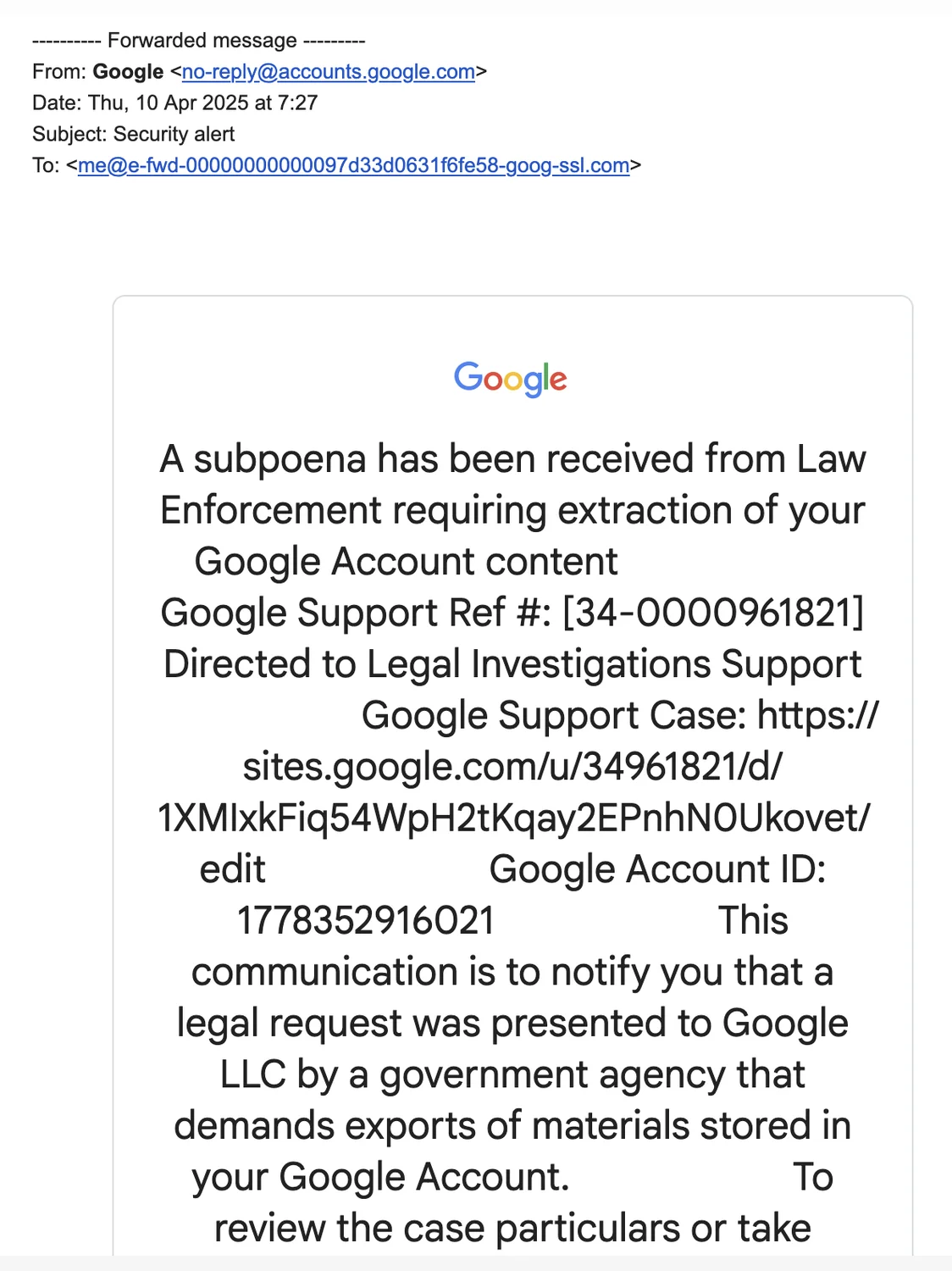
Let me be clear about what happened. The attacker did NOT compromise Google’s mail servers. And I know what you’re thinking: wouldn’t changing the text of an intercepted email break the DKIM signature’s integrity? You’re absolutely right, it would.
But the clever trick is that the attacker didn’t alter the content of an existing email. Instead, they modified the content BEFORE the signature was created.
How They Injected Phishing Text
Here’s how it works 🔍. Many platforms take user input and include it in automated emails. For example, a username appears in welcome emails, a buyer’s name shows up in purchase confirmations, and support tickets include the original description.
In the Google DKIM replay attack, the attacker targeted a specific field included in Google’s automated emails: the App Name in Google’s OAuth system.
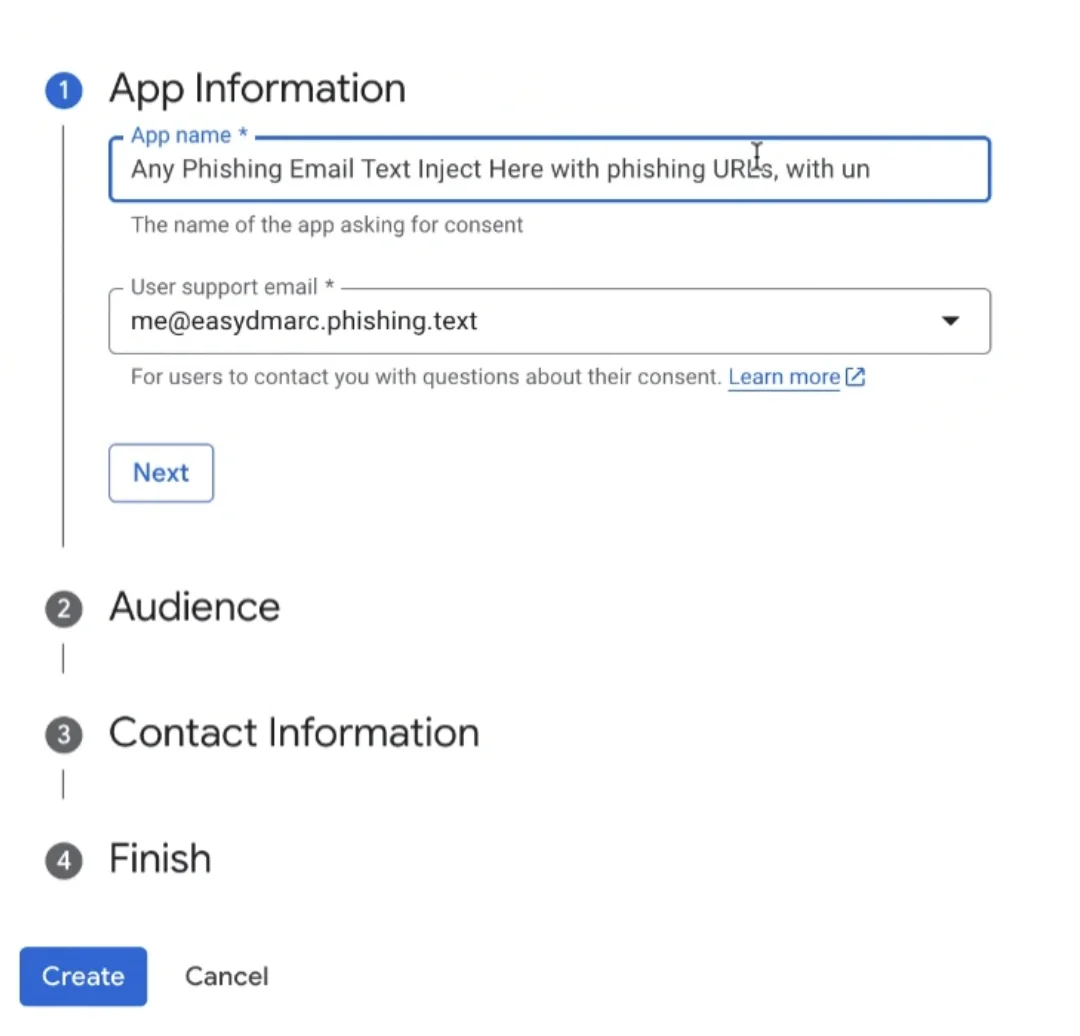
The attacker created a Google OAuth app and injected phishing text into the app name field. When Google generated the automated email, it pulled in that malicious text as part of the message. Google’s mail server then DKIM-signed it like any normal email. Then the attacker simply replayed that valid signed email to thousands of victims using their own mail infrastructure 😈.
In this attack, SPF, DKIM, and DMARC passed ✅.
Apple and PayPal DKIM Replay Cases
Another great example is the wave recently disclosed by Kaseya. Attackers used similar techniques against Apple and PayPal, exploiting user-controlled input fields that get reflected in automated emails.
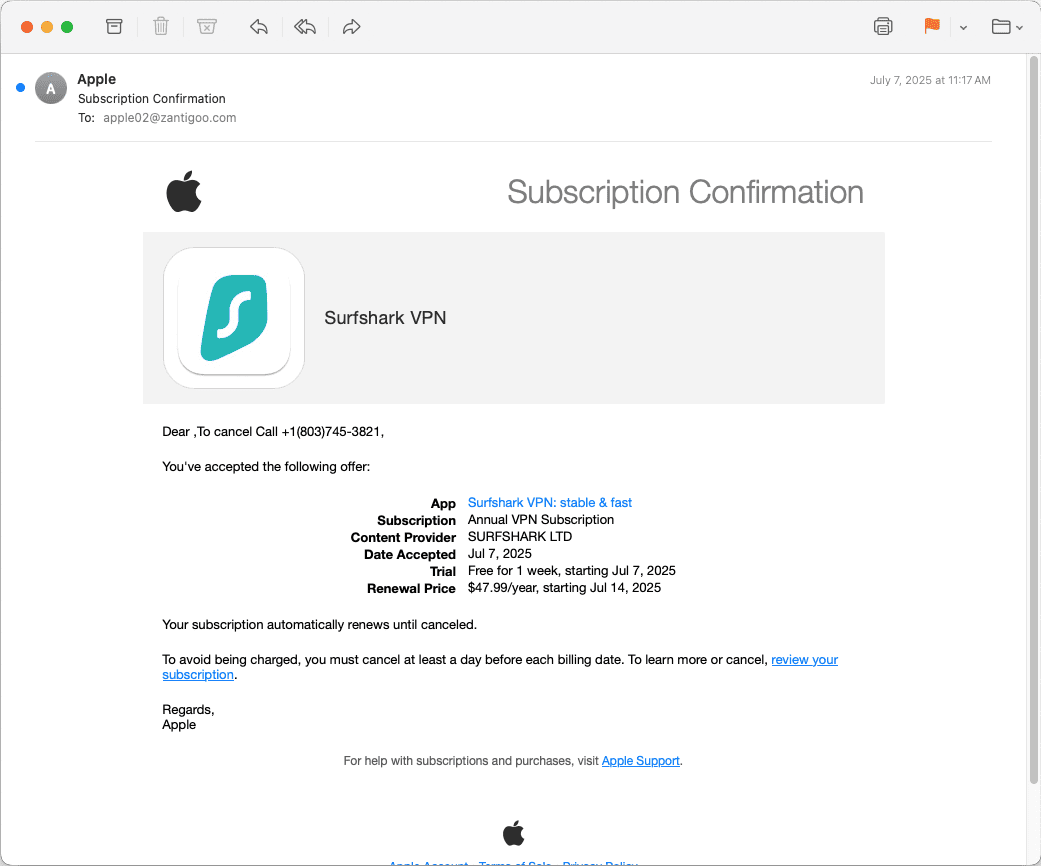
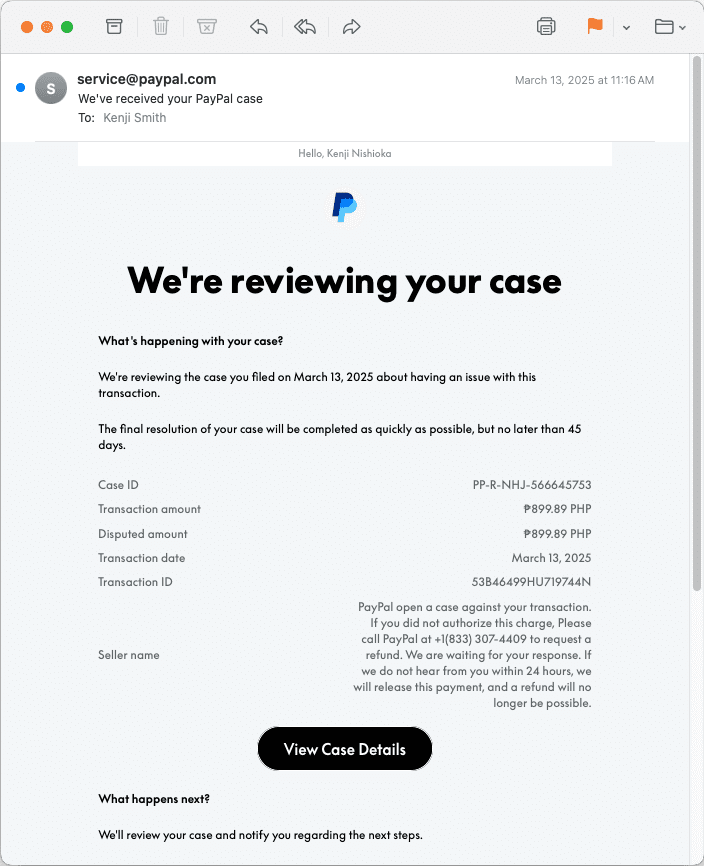
In both cases, the receiving SMTP servers see emails that appear to come from these highly reputable senders. The DKIM and DMARC protocols pass perfectly (DMARC passes because DKIM aligns. Also SPF might not always pass).
Because of the sender’s strong reputation, these emails bypass spam filters and land straight in the inbox. Users see a domain they trust, and all technical checks appear valid, so most people will likely assume the email is real.
Why This Matters for Your Business
Your business domain can be targeted because attackers want to abuse your domain’s reputation. This puts your clients and stakeholders at risk of data breaches or financial fraud. But the damage goes beyond money losses. These attacks hurt something deeper: the trust you’ve built with your clients and the market 😬.
Your domain reputation takes a hit too. Marketing emails and customer communications may start landing in spam folders because email providers may link your domain to phishing activity, even if you weren’t directly responsible. And recovering from that? It can take months of clean email activity and strict monitoring to get back on track.
Secure Your Applications 🛡️
Before jumping into detection and mail server protection, let’s start with preventing your own applications and domain from being exploited.
Most platforms you develop today rely on email to communicate with users, from welcome messages to purchase confirmations and shipping updates. This attack is a clear reminder of why every user input field needs strict restrictions, especially when that input ends up in outgoing emails.
Input Validation Rules
If you’re including usernames or other user-provided data in your emails, you should implement restrictions like these:
- Character limit: No more than 16 characters for fields like usernames
- URL blocking: Should not include
httporhttpsanywhere in the input - URL shortener blocking: Block common URL shortener domains like
t.ly,bit.ly,is.gd, and similar services - Messaging app blocking: Block messaging domains like
wa.me(WhatsApp),t.me(Telegram),m.me(Facebook Messenger), and others - Special character restrictions: Limit or block special characters that don’t belong in names or typical user inputs
- And many more: Review your specific use cases and add appropriate restrictions
These might seem like small restrictions, but they make a huge difference in preventing abuse.
Use Separate Domains for New Users
Another powerful mitigation strategy is using a separate domain for new customers, especially if you allow anyone to sign up without verification or if you offer free plans.
If anyone can create an account and trigger emails, you need to make it much harder for bad actors to send even a single message.
Most accounts used in DKIM replay attacks are created with throwaway email addresses or brand new Gmail accounts. Attackers also use VPNs (Virtual Private Networks) or TOR connections to hide who they are.
This is why adding stronger fraud detection at the account creation stage can make a big difference. Tools like Maxmind , E-hawk , or Sift can spot suspicious signups early. This not only helps stop DKIM replay abuse but also lowers the risk of other account-based attacks.
Securing Your Sending Mail Server 📨
There’s no magic button to fully prevent DKIM replay attacks today, but domain and mail server owners can take steps to reduce their likelihood and impact.
- Set expiration times (
x=) as short as feasible to limit replay windows, especially for new or suspicious accounts. While not originally intended as replay defense ( as per RFC 6376 ), this has proven effective in practice.- Setting a short expiation may affect retry queue. If your mail server uses a retry queue for failed deliveries, re-sign those messages each time they’re retried.
- Oversign critical headers like Date, Subject, From, To, CC, etc. This prevents attackers from injecting missing or additional headers that could change how the email appears to recipients.
- Always sign the full message body by avoid the
l=tag for partial signing. This leaves no room for attackers to append malicious content. - Sign with customer domains when possible. This is especially suitable for email marketing and web hosting companies, as it helps protect your platform’s domain reputation.
- Add user identity tags (
i=) if you can’t use customer domains. This helps pinpoint which account is the source when abuse is reported. - Implement DKIM key rotation so you can quickly rotate keys if needed during an active attack, though expiration times (
x=tag) should be your primary control.- Diversifying your DKIM selectors can help. Using different selectors for separate mail streams (marketing, transactional, support) means you can rotate one key without disrupting your entire mail setup.
- Filter outbound mail content to block malicious links or other harmful elements before they leave your infrastructure.
- Monitor with DMARC reports to track your domain’s email traffic and catch unusual patterns early.
Securing Your Receiving Mail Server 🔒
As mentioned earlier, the structure of this attack makes it very hard to detect or prevent, but there are steps you can take to protect your environment:
- Enforce RFC 5322 header compliance strictly, like Gmail does. Many replay attacks rely on manipulating headers in ways that violate email standards.
- Monitor for traffic spikes from domains that normally send little mail. A sudden rise in DNS validation requests can be a sign that a replay attack is in progress.
- Track DKIM signature volumes and watch for gaps between the number of emails you expect and what you actually receive. If a domain normally sends you 100 emails a day but suddenly sends 10,000 with identical signatures, that is a red flag 🚩.
- Implement domain-specific rules for trusted senders you regularly hear from. Set rules to ensure the sender IP matches known legitimate ranges. The next section provides specific examples.
Hunting for DKIM Replay Attacks 🔍
Detecting DKIM replay attacks is really challenging because they pass all standard authentication checks. However, here are some practical techniques for hunting possible DKIM replays.
PayPal DKIM Replay Detection
Below is a KQL query developed by Steven Lim that detects emails where the sending SMTP IP address is outside PayPal’s known network ranges. This is a strong indicator of malicious replay activity.
EmailEvents
| where Timestamp > ago(30d)
| where SenderFromAddress == "[email protected]"
| where parse_json(AuthenticationDetails).DKIM == "pass" and
parse_json(AuthenticationDetails).DMARC == "pass"
| where not (ipv4_is_in_range(SenderIPv4,"64.4.240.0/21") or
ipv4_is_in_range(SenderIPv4,"64.4.248.0/22") or
ipv4_is_in_range(SenderIPv4,"66.211.168.0/22") or
ipv4_is_in_range(SenderIPv4,"91.243.72.0/23") or
ipv4_is_in_range(SenderIPv4,"173.0.80.0/20") or
ipv4_is_in_range(SenderIPv4,"185.177.52.0/22") or
ipv4_is_in_range(SenderIPv4,"192.160.215.0/24") or
ipv4_is_in_range(SenderIPv4,"198.54.216.0/23"))
| where EmailDirection == "Inbound" and DeliveryAction != "Blocked"
This query looks for emails that claim to be from PayPal’s service address and pass both DKIM and DMARC checks, but come from IP addresses that aren’t in PayPal’s legitimate network ranges.
Apple DKIM Replay Attack
Similarly, here’s a KQL query also developed by Steven Lim for detecting Apple email replays. This query checks for emails from Apple’s no-reply address that pass authentication but originate from outside Apple’s network.
EmailEvents
| where Timestamp > ago(30d)
| where SenderFromAddress == "[email protected]"
| where parse_json(AuthenticationDetails).DKIM == "pass" and
parse_json(AuthenticationDetails).DMARC == "pass"
| where EmailDirection == "Inbound" and DeliveryAction != "Blocked"
| where not (ipv4_is_in_range(SenderIPv4,"17.0.0.0/10") or
ipv4_is_in_range(SenderIPv4,"17.64.0.0/13") or ipv4_is_in_range(SenderIPv4,"17.72.0.0/14") or
ipv4_is_in_range(SenderIPv4,"17.76.0.0/17") or ipv4_is_in_range(SenderIPv4,"17.76.128.0/18") or
ipv4_is_in_range(SenderIPv4,"17.76.192.0/19") or ipv4_is_in_range(SenderIPv4,"17.76.224.0/20") or
ipv4_is_in_range(SenderIPv4,"17.76.240.0/21") or ipv4_is_in_range(SenderIPv4,"17.76.252.0/22") or
ipv4_is_in_range(SenderIPv4,"17.77.0.0/16") or ipv4_is_in_range(SenderIPv4,"17.78.0.0/15") or
ipv4_is_in_range(SenderIPv4,"17.80.0.0/12") or ipv4_is_in_range(SenderIPv4,"17.96.0.0/11") or
ipv4_is_in_range(SenderIPv4,"17.128.0.0/10") or ipv4_is_in_range(SenderIPv4,"17.192.0.0/11") or
ipv4_is_in_range(SenderIPv4,"17.224.0.0/12") or ipv4_is_in_range(SenderIPv4,"17.240.0.0/13") or
ipv4_is_in_range(SenderIPv4,"17.248.0.0/14") or ipv4_is_in_range(SenderIPv4,"17.252.0.0/16") or
ipv4_is_in_range(SenderIPv4,"17.253.0.0/23") or ipv4_is_in_range(SenderIPv4,"17.253.2.0/23") or
ipv4_is_in_range(SenderIPv4,"17.253.4.0/22") or ipv4_is_in_range(SenderIPv4,"17.253.8.0/21") or
ipv4_is_in_range(SenderIPv4,"17.253.16.0/23") or ipv4_is_in_range(SenderIPv4,"17.253.18.0/24") or
ipv4_is_in_range(SenderIPv4,"17.253.19.0/24") or ipv4_is_in_range(SenderIPv4,"17.253.20.0/22") or
ipv4_is_in_range(SenderIPv4,"17.253.24.0/24") or ipv4_is_in_range(SenderIPv4,"17.253.25.0/24") or
ipv4_is_in_range(SenderIPv4,"17.253.26.0/23") or ipv4_is_in_range(SenderIPv4,"17.253.28.0/22") or
ipv4_is_in_range(SenderIPv4,"17.253.32.0/23") or ipv4_is_in_range(SenderIPv4,"17.253.34.0/24") or
ipv4_is_in_range(SenderIPv4,"17.253.35.0/24") or ipv4_is_in_range(SenderIPv4,"17.253.36.0/22") or
ipv4_is_in_range(SenderIPv4,"17.253.40.0/21") or ipv4_is_in_range(SenderIPv4,"17.253.48.0/22") or
ipv4_is_in_range(SenderIPv4,"17.253.52.0/23") or ipv4_is_in_range(SenderIPv4,"17.253.54.0/24") or
ipv4_is_in_range(SenderIPv4,"17.253.55.0/24") or ipv4_is_in_range(SenderIPv4,"17.253.56.0/23") or
ipv4_is_in_range(SenderIPv4,"17.253.58.0/23") or ipv4_is_in_range(SenderIPv4,"17.253.60.0/22") or
ipv4_is_in_range(SenderIPv4,"17.253.64.0/21") or ipv4_is_in_range(SenderIPv4,"17.253.72.0/22") or
ipv4_is_in_range(SenderIPv4,"17.253.76.0/23") or ipv4_is_in_range(SenderIPv4,"17.253.78.0/23") or
ipv4_is_in_range(SenderIPv4,"17.253.80.0/22") or ipv4_is_in_range(SenderIPv4,"17.253.84.0/22") or
ipv4_is_in_range(SenderIPv4,"17.253.88.0/22") or ipv4_is_in_range(SenderIPv4,"17.253.92.0/23") or
ipv4_is_in_range(SenderIPv4,"17.253.94.0/23") or ipv4_is_in_range(SenderIPv4,"17.253.96.0/21") or
ipv4_is_in_range(SenderIPv4,"17.253.104.0/22") or ipv4_is_in_range(SenderIPv4,"17.253.108.0/23") or
ipv4_is_in_range(SenderIPv4,"17.253.110.0/24") or ipv4_is_in_range(SenderIPv4,"17.253.111.0/24") or
ipv4_is_in_range(SenderIPv4,"17.253.112.0/21") or ipv4_is_in_range(SenderIPv4,"17.253.120.0/24") or
ipv4_is_in_range(SenderIPv4,"17.253.121.0/24") or ipv4_is_in_range(SenderIPv4,"17.253.122.0/24") or
ipv4_is_in_range(SenderIPv4,"17.253.123.0/24") or ipv4_is_in_range(SenderIPv4,"17.253.124.0/22") or
ipv4_is_in_range(SenderIPv4,"17.253.128.0/17") or ipv4_is_in_range(SenderIPv4,"17.254.0.0/15") or
ipv4_is_in_range(SenderIPv4,"57.102.0.0/15") or ipv4_is_in_range(SenderIPv4,"57.112.0.0/12") or
ipv4_is_in_range(SenderIPv4,"65.199.22.0/23") or ipv4_is_in_range(SenderIPv4,"139.178.128.0/18") or
ipv4_is_in_range(SenderIPv4,"144.178.0.0/18"))
Creating Rules for Other Domains
You can create similar detection rules for other well-known reputable mail senders your organization regularly receives email from.
Important
The key is maintaining an updated list of legitimate IP ranges for each trusted sender and alerting when emails pass authentication but come from unexpected sources.
Conclusion: Stay Vigilant 🎯
Whether you’re on the red team or blue team, DKIM replay attacks deserve your serious attention.
For offensive security teams, this technique shows how legitimate email infrastructure can be weaponized. Understanding these attack vectors helps you think like an attacker and test them during your engagements.
For defensive security teams, vigilance is key. Monitor both incoming and outgoing email traffic closely. Yes, detecting and preventing DKIM replay attacks at scale is challenging, but that’s exactly why we need layered defenses across your applications, SMTP servers, and email gateways.
Here’s the reality: these attacks aren’t going away. In fact, they’re likely to increase in frequency and intensity over the coming months and years 📈.
The attack evolution we’ve witnessed recently proves this trend. Threat actors have seen the success of these attacks, learned from them, and are now likely to adopt these techniques against major companies with well-reputed domains. So keep an eye on your environment because this is exactly what makes it a constant game of cat and mouse between attackers and defenders.
As defenders improve their security posture and implement better protections, attackers simultaneously refine their tactics and find new exploitation methods. The cycle continues endlessly.
So what’s the best thing we can do? Stay informed, implement robust detection mechanisms, and never assume our current defenses are “good enough”.
Your employees, customers, and clients are counting on you. Don’t let them down 🔐.