Clever DNS Security Trick: The 0x20 Encoding Story
Last modified on February 21, 2026 • 11 min read • 2,228 words
Why Your DNS Queries Look Like a Broken Caps Lock Key ?
Imagine typing google.com into your browser. Everything looks normal to you, but behind the scenes, your DNS server is actually asking for GoOgLe.CoM. Sounds weird, right?
This isn’t a bug. It’s one of the smartest security tricks in modern internet infrastructure!
The best part? You’d never know this is happening unless you’re an admin digging through DNS server logs or inspecting DNS packets. Regular users never see this weird capitalization because it all happens invisibly between DNS servers.
I recently noticed this strange behavior on a public DNS BIND server I deployed ( in the last blog post ), and it sent me down a fascinating rabbit hole.
Below are some DNS logs with unusual capitalization, extracted from my DNS server.
172.253.13.150#56659 (chnUk1.NUlL.dnS.RbsEC.bLOg): query: chnUk1.NUlL.dnS.RbsEC.bLOg IN NULL
172.253.12.213#34391 (cHUnK0.nulL.dns.rBsEC.bLoG): query: cHUnK0.nulL.dns.rBsEC.bLoG IN NULL
172.253.228.154#43305 (cHUNk0.NULL.DNS.rBSec.BlOG): query: cHUNk0.NULL.DNS.rBSec.BlOG IN NULL
172.253.13.158#54838 (chunk0.nuLl.DNs.RbSEc.BLoG): query: chunk0.nuLl.DNs.RbSEc.BLoG IN NULL
172.253.13.158#54516 (cHUnK0.NUlL.DnS.RbSEC.blOG): query: cHUnK0.NUlL.DnS.RbSEC.blOG IN NULL
172.253.228.144#51348 (MetA.cHuNK.nULl.dns.rbSeC.BloG): query: MetA.cHuNK.nULl.dns.rbSeC.BloG IN TXT
172.253.13.154#51136 (mEta.ChUNK.NuLl.DNS.rbseC.BloG): query: mEta.ChUNK.NuLl.DNS.rbseC.BloG IN TXT
172.253.13.157#59851 (MEta.chUnk.NuLL.dNS.rBSEc.bLog): query: MEta.chUnk.NuLL.dNS.rBSEc.bLog IN TXT
Before we dive into the clever solution, let’s talk about the problem that needed solving, starting from the basics.
What is DNS?
Think of DNS as the internet’s phonebook. When you type facebook.com into your browser, your computer asks a DNS server, “Hey, what’s the address for Facebook?”
The DNS server responds with something like “It’s at 157.240.1.35.” Simple, right?
The Scary Security Hole
But here’s the scary part. The original DNS system was built in the 1980s when the internet was small and everyone trusted each other. Nobody thought bad guys would try to mess with it.
DNS servers typically use a protocol called UDP, which is super fast but doesn’t verify who sent the response. It’s like shouting your question across a crowded room.
You’ll get an answer quickly, but you can’t be certain it came from the right person. Someone else could shout back a fake answer first!
What is a Transaction ID in DNS?
There’s a crucial concept we need to understand before moving forward: DNS transaction IDs.
Imagine you’re at a busy coffee shop where 50 people are ordering at once. When you place your order, they give you a numbered ticket. Let’s say it’s “#237”.
When your coffee is ready, they call out “#237” and you know that’s your coffee, not someone else’s.
How DNS Uses Transaction IDs?
DNS works the same way. When your DNS server asks “Where’s bank.com?”, it doesn’t just send the question. It also includes a transaction ID number (like 0xf526, 0xfe93, or any other value).
When the response comes back, it must include that exact same ID number, or the DNS server will ignore it.
This system exists because (remember) DNS uses UDP, that “crowded room” protocol. Multiple DNS servers might be asking the same authoritative server hundreds of questions at the same time.
Without transaction IDs, how would each server know which answer belongs to which question? It would be chaos!
How Hackers Exploit This: DNS Cache Poisoning
Now with all the background information, here’s how a “DNS cache poisoning” attack works in simple terms:
-
Your DNS server asks: “Where’s
bank.com?” -
A hacker quickly replies with a fake answer: “
bank.comis atMY-EVIL-SERVER.com”- Here’s the trick: If the hacker’s fake answer arrives before the real one AND has the same transaction ID as the request, the DNS server will accept it and save (cache) the fake information
-
The guessing game: The attacker may not guess the correct transaction ID on the first try, but they can keep guessing until they get lucky before the real answer arrives
-
Everyone gets hacked: Now everyone using that DNS server gets sent to the hacker’s fake domain instead of the real domain!

I know you might still have questions, but keep reading! Below we’ll dive into the story of how things started out insecure, and how defenders kept adding security one brick at a time.
How Attackers and Defenders Kept Raising the Stakes
In the early days of the internet, DNS servers had almost no security. Every query used a simple transaction ID that just counted up (1, 2, 3, 4…) and always sent from the same port (port 53).
It worked fine when everyone was friendly, but it was laughably easy for attackers to predict 😈.
Random Transaction ID: First Line of Defense
The first improvement was simple. Make the transaction ID random!
Every DNS query gets a random ID number between 0 and 65,535 (ID is a 16 bit value so that’s 2^16 possibilities). The response must include this exact ID to be accepted.
Security folks thought, “65,536 possibilities! That should keep us safe, right?”
Why It Wasn’t Enough
Well, it worked for a while, but not for long. With computers getting faster (able to send 10,000+ packets per second), they could try all 65,536 possibilities in just a few seconds.
An attacker could spam thousands of fake replies with different IDs and eventually get lucky.
So defenders needed to develop another layer of security!
Port Randomization: Raising the Bar
The security community fought back. “Let’s randomize the source port!” they said.
Instead of always using port 53, DNS servers started choosing randomly from up to 65,536 different ports. Now attackers had to guess BOTH the transaction ID AND the port number.
The Math Looks Good
Combined, that’s 32 bits total. About 4 billion combinations. Sounds impressive, right?
Note
In most cases, DNS servers will not use the full source port range. For example, they might avoid well-known ports below 1024, which are typically used by other protocols.
The Problem Still Exists
But here’s the problem. The attacker doesn’t need to guess everything perfectly on the first try. They just need one successful fake reply to arrive before the legitimate response.
DNS queries typically take 20 to 100 milliseconds to complete. During this tiny window, an attacker can send thousands of guesses.
If they can fire off 10,000 fake replies per query, they still have a decent chance of winning the race. It’s like a lottery where you can buy thousands of tickets for each drawing!
The Kaminsky Attack: Breaking All Defenses (Almost Game Over)
In 2008, Dan Kaminsky dropped a bombshell that changed everything. He discovered a devastating trick that made all previous defenses look like paper walls.

Instead of waiting for users to naturally query bank.com and hoping to win that one race, Kaminsky realized attackers could trigger unlimited queries themselves!
Here’s the genius (and terrifying) part:
How the Kaminsky Attack Works
-
The attacker asks the victim DNS server: “What’s the IP for
random123.bank.com?” -
The DNS server doesn’t know, so it asks
bank.com’s authoritative server -
During that query, the attacker floods the victim server with fake responses. But here’s the twist: they don’t just lie about
random123.bank.com.- They poison the whole domain instead: They include malicious NS (nameserver) records saying “All of
bank.comis handled byMY-EVIL-SERVER.com”
- They poison the whole domain instead: They include malicious NS (nameserver) records saying “All of
-
One success ruins everything: If even ONE fake response gets accepted, the DNS server now believes the attacker’s server is authoritative for the ENTIRE
bank.comdomain!
Why This Was So Devastating
This was brilliant and devastating at the same time. The attacker could query random456.bank.com, random789.bank.com, and so on. Any made-up subdomain that doesn’t exist would work.
Each failed lookup gave them another chance to inject fake NS records. They could make thousands of attempts per second!
By poisoning the NS record instead of individual domain records, one successful attack compromised the entire domain. It wasn’t just one domain anymore. It was every single subdomain under that domain.
Game over. ⚠️ The internet security community panicked. Port randomization and transaction IDs weren’t enough.
They needed something more. Something clever that didn’t require rebuilding the entire internet infrastructure. The clock was ticking.
0x20 Encoding: The Random Capitalization Defense
So how does randomly capitalizing letters help security? Let’s break down this brilliant trick.
The Technical Magic Behind 0x20
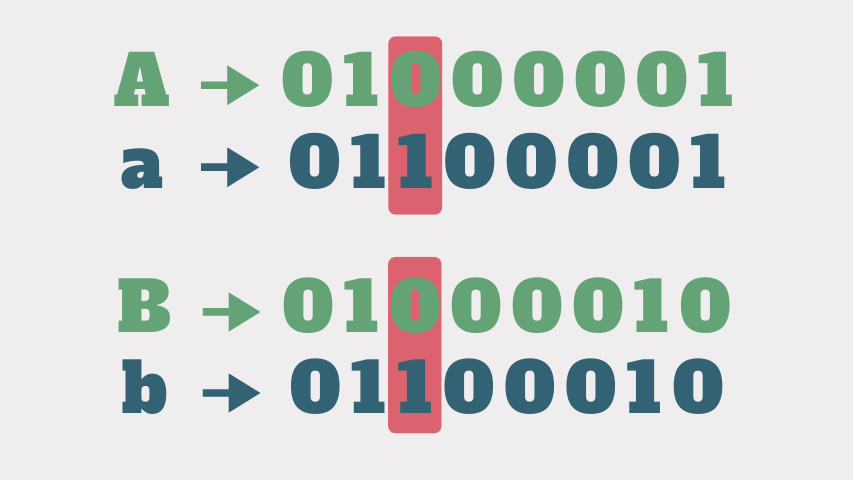
First, the name “0x20” comes from how computers represent text. In ASCII, the difference between uppercase ‘A’ and lowercase ‘a’ is literally just one bit. That bit is called bit 0x20.
When that bit is 1, you get lowercase. When it’s 0, you get uppercase.
DNS Doesn’t Care About Capitalization
Here’s the clever part. DNS doesn’t care about uppercase or lowercase. The domains Example.COM and example.com and ExAmPlE.cOm all point to the exact same domain.
DNS treats them as identical.
DNS Servers Echo Back What You Send
Another genius fact is that most DNS servers preserve whatever capitalization you send them. If you ask for GoOgLe.CoM, they reply with GoOgLe.CoM in their answer, even though technically they don’t care about the capitalization.
How This Becomes a Security Shield
Now here’s where the magic happens. Modern DNS servers use 0x20 encoding to do something crazy and smart when they send queries.
Let me walk you through exactly how this works:
Step 1: Your DNS Server Gets a Request
You type example.com into your browser. Your computer asks your DNS server, “Where’s example.com?” (using normal lowercase, just like you’d expect).
Step 2: Random Capitalization Magic
Before your DNS server forwards this question to the authoritative server, it randomly scrambles the capitalization.
Instead of asking for example.com, it might ask for ExAmPLe.cOm or eXample.Com or EXAMPLE.com.
The pattern is completely random and unpredictable. Think of it like creating a unique fingerprint for this specific query.
Note
If you want to learn how exactly the randomization is done, you can check out the official 0x20 encoding solution paper .
Step 3: The Authoritative Server Echoes Back
As mentioned above, most DNS servers are polite. They echo back whatever capitalization you send them.
If you ask for ExAmPLe.cOm, they reply with ExAmPLe.cOm in their answer, even though they don’t actually care about uppercase or lowercase themselves.
Step 4: Verification Time
When responses start arriving, your DNS server checks each one carefully:
- ✅ Does the transaction ID match?
- ✅ Does the source port match?
- ✅ Does the capitalization EXACTLY match what I sent? ← This is the new check!
Step 5: Reject the Fakes
If the capitalization doesn’t match perfectly (even if just ONE letter is wrong), the DNS server knows something’s fishy and throws away that response.
It only accepts answers that match ALL the criteria, including the exact random capitalization pattern.
Why Attackers Can’t Beat This
Remember the attacker from earlier who was flooding fake responses? Now they have a much bigger problem. They need to guess:
- Transaction ID: 65,536 possibilities (16 bits)
- Source Port: 65,536 possibilities (16 bits)
- Capitalization Pattern: This depends on the domain length
The Beautiful Math 🧮
For example.com (10 letters), that’s 210 = 1,024 additional possibilities for the capitalization alone.
For longer domains like www.bankofamerica.com (18 letters, not counting dots), that’s 218 = 262,144 extra combinations!
Each letter in the domain name doubles the attacker’s work:
- A short domain like
cia.gov(6 letters) adds 64 possibilities - A medium domain like
tiktok.com(9 letters) adds 512 possibilities - The longer the domain, the better the protection!
The Attack Becomes Nearly Impossible
Let’s compare what an attacker faces:
- Without 0x20: They need to guess 32 bits (transaction ID + port) = 4,294,967,296 combinations
- With 0x20 (6 letters): They need to guess 38 bits (32 + 6 letters) = 274,877,906,944 combinations
- With 0x20 (11 letters): They need to guess 43 bits (32 + 11 letters) = 8,796,093,022,208 combinations

Even a short domain like cia.gov makes the attack 64 times harder! For longer domains, it’s over 2,000 times harder 🤯
The attack went from “difficult but possible” to “practically impossible” with this one simple trick.
Real-World Implementation
Google didn’t just jump into this immediately. They started testing 0x20 encoding back in 2009 on a small number of servers.
By 2023, they rolled it out globally on Google Public DNS (8.8.8.8).
Why It Works So Well
The beauty of this solution is that it’s “lightweight”. It doesn’t require massive infrastructure changes. It just works, adding an extra layer of protection with minimal overhead.
The Small Challenges
There are some challenges though. About 0.3% of DNS servers don’t properly preserve the capitalization, which can cause resolution failures.
Google implemented automatic detection and fallback mechanisms to handle these edge cases. They also maintain a small exception list for non-compliant servers.
Conclusion: Simple Solutions for Complex Problems
The 0x20 encoding technique is a perfect example of creative problem-solving in cybersecurity. Instead of rebuilding the entire DNS infrastructure, engineers found a clever way to use an existing quirk (case preservation) to add meaningful security. 💡
So next time you see weird capitalizations like wWw.ExAmPLe.cOm in your DNS logs, don’t freak out! It’s actually your DNS server working hard to keep you safe from poisoning attacks.
It’s proof that sometimes the best security solutions aren’t the most complex ones. They’re the simple and clever ones that work with what we already have.
The internet may have been built on trust, but thanks to innovations like 0x20 encoding, we can add layers of security without breaking everything that already exists. And that’s pretty cool if you ask me! 🚀